AI agent cost
Know what each AI agent costs, and stop paying for waste
Provider invoice
Same spend, per workflow
3 cost layers
Model usage, runtime, human review: we measure all three
Weekly
Cost review so token drift is caught before the invoice
Per workflow
Cost per completed task, not one provider total
Cost architecture
Your bill is three costs, and the invoice only shows one
Model usage
Variable, biggest lever
Tokens, context size, retries and fallback calls. Usually the biggest and the easiest to cut.
Runtime
Mostly fixed
Hosting, queues, orchestration and logging. Mostly fixed. Size it to real volume.
Ops
Falls as accuracy rises
The people who review outputs and handle exceptions. Falls as accuracy rises.
Where spend leaks
Six reasons your agent costs more than it should
Where it leaks: Session design: long sessions keep re-sending old context.
Fix: Session limits and summaries between steps.
Where it leaks: Context and tokens: whole documents go into every prompt.
Fix: Tighter retrieval that sends only the passages needed.
Where it leaks: Tool strategy: the agent calls tools “just in case”.
Fix: A tool-call policy that limits which tools run at each step.
Where it leaks: Model routing: a premium model classifies simple emails.
Fix: Route easy steps to a smaller model, keep the large one for judgment calls.
Where it leaks: Pipeline orchestration: failed steps retry in loops.
Fix: Retry caps, clean handoffs and a human exception queue.
Where it leaks: Operational discipline: nobody looks until the invoice arrives.
Fix: A weekly cost review per workflow with an owner.
What we change in your agent
We audit one live workflow, tag every model call, tool call and retry to that workflow, then apply the fixes above in order of cost impact. You get a live dashboard and a weekly review cadence.
Book an agent cost reviewBefore
Every loop is paid for.
After
One retry, then a person.
Live tracking example
See spend by agent, model, and day
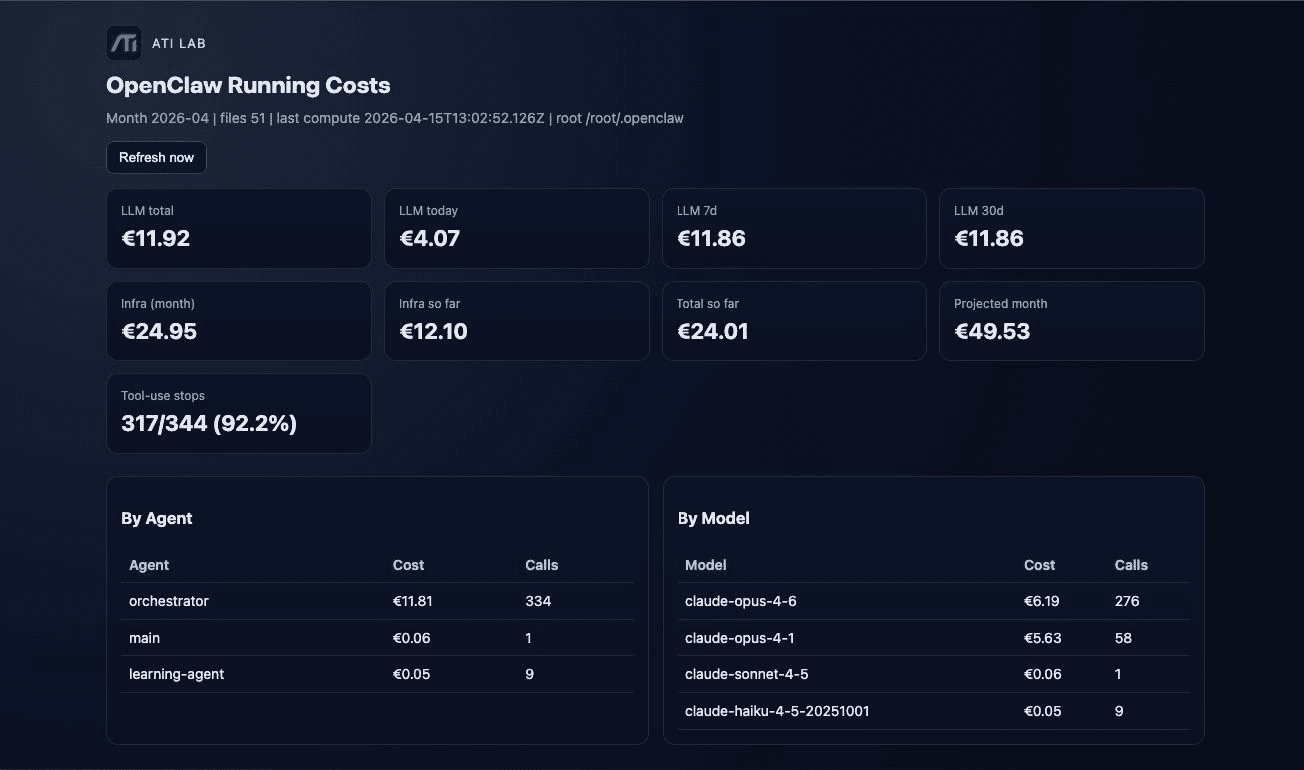
Screenshot from the cost dashboard on ATI Lab's own internal agent setup.
- Time window. Spend today, last 7 days and last 30 days, so drift shows up within the week.
- Spend by agent. Cost and call count per agent, so you know which workflow drives the bill.
- Spend by model. Cost per model, so you can see whether a cheaper model could take more of the work.
Practical framework
Five steps to track agent cost per workflow
Map steps
Every workflow step becomes a measurable cost event.
Log usage
Tokens, retries and tool calls per task.
Separate baseline
Baseline volume apart from exception volume.
Tag value
Mark high-value actions so cuts stay outcome-led.
Review weekly
By workflow, not only by provider invoice.
Owner
Typical cost bands
FAQ
AI agent cost questions
How much does an AI agent cost?
It depends on volume and design, so there is no honest flat price. The biggest swing factors are context size, model choice per step, and retries, all of which can be reduced after launch. Tracking cost per completed task is the fastest way to get a real number for your own workflow.
Can you reduce the cost of an agent we already run?
Yes. We add per-workflow tracking first, then change routing, context and retry rules in order of savings. Your existing stack stays in place.
What drives AI agent cost the most?
Oversized context, unnecessary tool calls, a premium model on every step, and retry or fallback loops created by weak orchestration. Each has a specific fix, listed above.
Is AI agent cost fixed or variable?
Mostly variable. Even with fixed platform fees, total spend moves with workload volume, task complexity, human handoffs, and how efficiently sessions, tokens and tools are used.
How do we track AI agent cost in real time?
Tag every model call, tool call and retry to the workflow that caused it, then report cost per completed task by agent, model and day. That shows where context is bloated, where tools are over-called and where orchestration creates avoidable spend.
How often should we review AI agent cost?
Weekly for active deployments. Monthly review is usually too slow to catch token drift, tool-call creep and retry loops before they compound.
Next step